
How to add QR codes and barcodes to labels
User guide contents ↓Trimto generates vector-based codes: sharp and crisp at any size, ensuring reliable barcode scanner readability.
To give each label its own code from a spreadsheet, see variable data printing.
Add a code
Click Code ▾ on the Add toolbar, then choose QR code or Barcode (Code 128).

“Code” menu: QR code or barcode In the right sidebar, under Code content:
- Code type: 2D codes (QR, Data Matrix, PDF417) and 1D barcodes (Code 128, EAN-13, UPC-A, UPC-E, EAN-8, Code 39, ITF-14, GS1-128). Changing the type keeps your content.
- Code content: website link, phone number, product SKU…
- Code color: high-contrast dark colors (K100 black) on a light background are recommended.
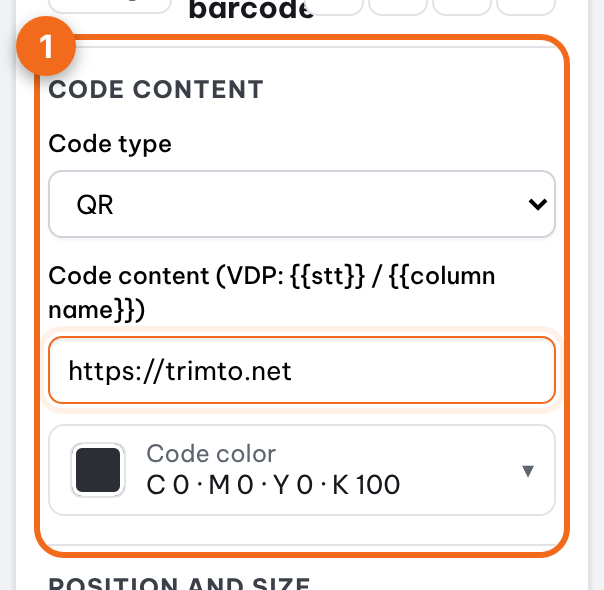
“Code content” section: code type, content, color Drag the code into place, and drag the corner handles to resize. Enter exact dimensions under Position and size.
Choose a code type
| Type | Best for |
|---|---|
| QR | Website links, social media, product information |
| Code 128 | Internal tracking codes, batch numbers, serial numbers |
| EAN-13 | Retail product barcodes outside North America (12 digits, or 13 with the check digit) |
| UPC-A | Retail product barcodes in the US and Canada (11 digits, or 12 with the check digit) |
| UPC-E | Compact retail barcodes for small packs (7 or 8 digits, starting with 0 or 1) |
| EAN-8 | Retail barcodes for very small packs (7 or 8 digits) |
| Code 39 | Asset tags, ID badges, automotive and defense labels (capital letters, digits, space and - . $ / + %; lowercase is converted to capitals) |
| ITF-14 | Shipping cartons and cases (13 or 14 digits) |
| GS1-128 | Logistics labels with application identifiers, e.g. (01)09521234543213(10)ABC123 |
| Data Matrix | Ultra-compact codes on electronics and component labels |
| PDF417 | Stacked codes holding a lot of text: tickets, ID cards, shipping documents |
For UPC-A, EAN-13, EAN-8 and ITF-14 you can leave out the check digit and Trimto adds it; if you type it, it must be correct. Trimto only draws the code from the digits you enter. It does not issue GS1 numbers: for products sold in shops, get your company prefix from GS1.
Invalid data formats (such as letters in a UPC-A code) will flag an error in the Preflight tab.
Tip: Need a unique code for each label (serial numbers, custom links)? See Sequential numbering and Excel data.
Why vector codes
A vector code is made of squares and bars drawn as shapes, not a picture. Printed on a 10 mm label or a 100 mm label, the edges stay straight and sharp, so scanners focus easily. A low-resolution bitmap code gets soft edges, which slows scanning or fails entirely, especially on glossy decals or rough paper.
Rules for a code that scans
- High contrast: dark code on a light background. Avoid white codes on colored backgrounds or pale colors such as yellow or pink.
- Quiet zone: leave a blank light margin around the code so the scanner can tell where it starts. For QR codes that is at least 4 modules (a module is one of the small squares); for EAN and UPC barcodes, roughly 3–4 mm left and right at normal size. Keep text and patterns out of this margin.
- Minimum size: a QR code with short content should be at least about 15 mm wide; the longer the content, the denser the code, so print it larger.
- No stretching: keep QR and Data Matrix codes square. Stretching one side breaks scanning.
- Test with a phone: scan the preview, then scan one real printed sheet before printing the whole run.
Common problems
| Symptom | Likely cause | Fix |
|---|---|---|
| Preflight shows an invalid code | Content breaks the standard, e.g. EAN-13 or UPC-A with letters or missing digits, GS1-128 without brackets | Edit Code content to match the format in the table above |
| Will not scan | Code too small, pale, or overlapped by text | Enlarge it, use K100 black, move text away |
| Long URL, crowded code | Link has many parameters | Use a short link so the code has fewer modules |
| Each label needs a different code | A single shared code is used | Use sequential numbers and Excel data |
Further reading
- GS1, Ten steps to barcode implementation: getting a company prefix and choosing the right barcode for retail products.
- Wikipedia, QR code, International Article Number (EAN) and Quiet zone.