
How to make an 8-page mini zine from one sheet
User guide contents ↓An 8-page mini zine is a small booklet made from one sheet of paper: print one side, fold, make one cut across the middle and push the ends together. Trimto places your 8 pages in 8 cells on a landscape sheet, in the right order and direction; the top row is rotated 180° so every page reads upright once folded.
The feature is the mini zine maker: in Book Imposition, pick 8-page mini zine under Binding type. For a zine with more than 8 pages use Saddle stitch (see How to make a booklet from a PDF).
Steps
Open Book Imposition, choose 8-page mini zine and upload your file: PDF or images, one page per cell, page 1 is the front cover and page 8 is the back cover. No file yet? Click Download 8-cell template (PDF) to get 8 pages at the exact size of each cell.
In the 8-page mini zine section (right column) check the diagram and adjust:
- Safe margin around the sheet: 4 mm by default, because office printers usually cannot print to the paper edge.
- Fold and cut lines: Full sheet (dashed lines are folds, the solid line is the cut), Edges only (folds become short ticks at the edge, the cut line stays) or Hidden.
- Pages that differ from the cell: Fit to cell (keeps the whole page), Keep size, center or Fill cell (covers the cell, trimming the overflow at the edges).
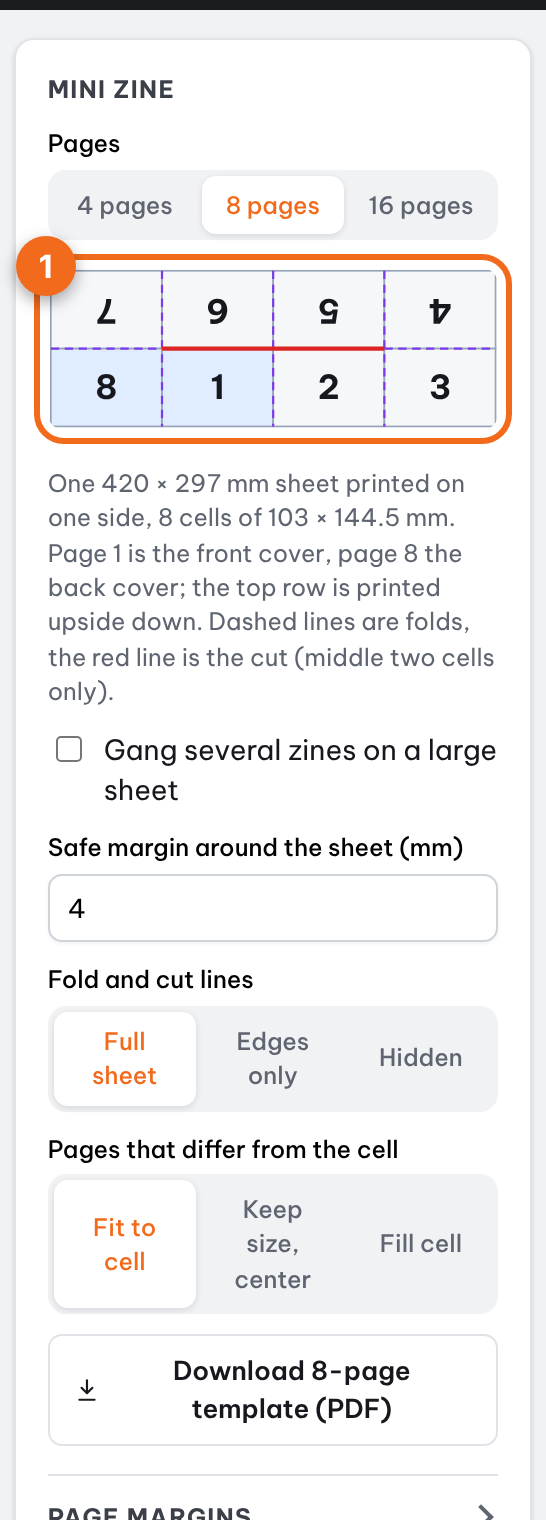
The mini zine section: 8-cell diagram, safe margin, fold and cut lines Click Continue, pick the sheet size (the sheet is always landscape) and preview the printed sheet: the top row is upside down, folds are dashed purple lines and the cut is red.
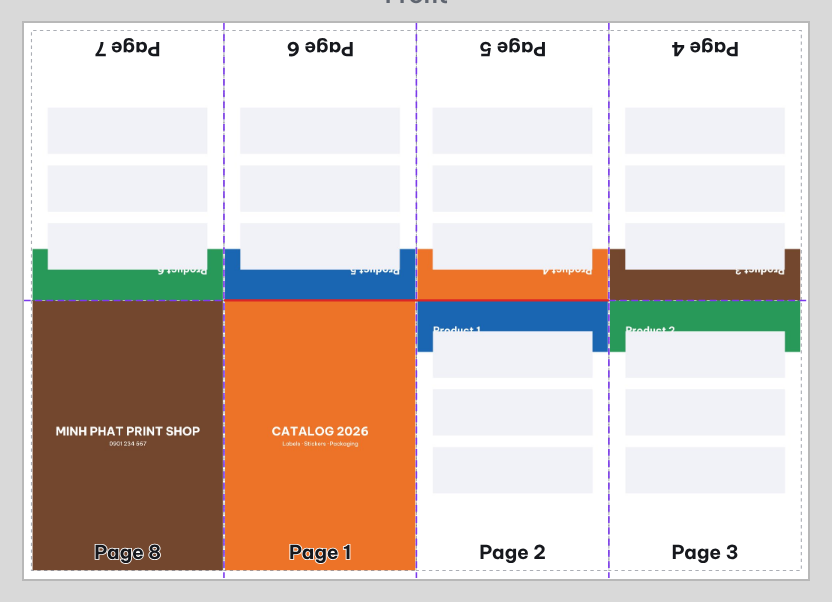
Mini zine sheet preview: 8 cells, the top row upside down Export PDF or Print now. In the print dialog choose one-sided and Actual size / 100%, not "Fit to page".
4-page and 16-page zines
In Mini zine, under Pages, choose 4, 8 or 16 pages. The cell diagram, template and post-print steps change with it.
- 4 pages (folded card): a portrait sheet with 2 × 2 cells, printed on one side. The top row (pages 3, 2) is upside down and the bottom row holds pages 4, 1. Fold in half across so the top row goes to the back, then fold in half the other way so the left half goes to the back. No cutting needed.
- 16 pages: a landscape sheet with 4 × 2 cells, printed on both sides (flip on the short edge). Front: 5, 12, 13, 4 (upside down) and 8, 9, 16, 1. Back: 3, 14, 11, 6 (upside down) and 2, 15, 10, 7. Fold in half across (top row to the back), fold in half the other way (left half to the back), then fold in half again (left half to the back). Staple twice on the spine fold on the left, then trim open the top and right edges. Keep a few millimeters of margin inside each page for that trim.
A 16-page zine can also be ganged on a large press sheet. Trimto mirrors the back side so each page lines up with the front.
Page numbers, page margins and flipbook
- Page numbers (right column, step 1): tick Number pages 2-7 (16-page zine: 2-15). The front cover (page 1) and back cover (last page) get no number. Count from the Front cover (page 2 prints 02) or from Page 2 (prints 01); font, size and position work as for books. Numbers on the top row turn upside down with their cells.
- Page margins: tick Add margins (file has none) to shrink the content inside each cell; the inside margin sits on the center fold of each spread.
- Flipbook preview: flip through the front cover, the spreads 2 | 3, 4 | 5, 6 | 7 and the back cover, with page numbers and margins, before you print.
Printing several zines on a large sheet
In 8-page mini zine, tick Gang several zines on a large sheet and pick One zine sheet (for example A4 or Letter, or a custom size). In step 2 choose the large press sheet (A3, SRA3, 13 × 19 in…): Trimto places identical zine sheets on it with the Safe margin and Cut settings (single or double cut, ± bleed, crop marks, 90° rotation to fit more) used for folded brochures. For full-bleed zines set White margin around the zine sheet to 0: bleed is added only on cells that touch the zine sheet edge. After printing, cut each zine sheet apart at the crop marks, then fold and cut as usual.
Example: a full-bleed A4 zine with 3 mm bleed fits 2 per SRA3 sheet (320 × 450 mm).
The 8-cell order
With the sheet landscape, left to right:
| Row | Page direction | Page order |
|---|---|---|
| Top row | Rotated 180° | 7 | 6 | 5 | 4 |
| Bottom row | Upright | 8 | 1 | 2 | 3 |
The pairs 8 | 1, 2 | 3, 4 | 5 and 6 | 7 sit side by side, exactly as they do when the booklet is open.
Fold and cut
- Fold the sheet in half across and unfold; fold it in half the other way and unfold; then fold each half to the center crease so you have all 3 vertical creases.
- Cut along the center crease, only the solid line across the two middle cells. Do not cut to the paper edge.
- Unfold, fold lengthwise and push the two ends together so the slit opens into a cross shape.
- Crease it flat: page 1 is the front cover and page 8 the back cover.
Paper size and page size
With a 4 mm safe margin each cell is: A4 72.3 × 101 mm, A3 103 × 144.5 mm, Letter 67.9 × 104 mm (2.67 × 4.09 in), Tabloid 106 × 135.7 mm (4.17 × 5.34 in). Design at this proportion and each page fills its cell; other proportions are fitted or centered according to your choice, with a note in the preview.
Common problems
- It prints smaller and the pages do not match the folds: the print dialog is set to "Fit to page". Choose Actual size / 100%; see PDF prints at the wrong size.
- Text near the edge is cut off: increase the Safe margin or keep content a few millimeters inside each page.
- A page looks upside down: the top row is rotated on purpose. If it is still upside down after folding, check the page order in your file (page 1 is the front cover).
- Cut all the way to the edge by mistake: only cut the solid line in the middle; the dashed lines are folds.
FAQ
What if my file has more than 8 pages? Trimto uses the first 8 pages and tells you in the preview. For a longer zine choose Saddle stitch.
Can I print it double-sided? A mini zine is printed on one side only; the sheet folds into layers so no back side is needed.
Can I print several zines at once on a large-format printer? Yes: tick Gang several zines on a large sheet, pick the size of one zine sheet, then choose the large press sheet in step 2.
Further reading
- Wikipedia, Zine: history and culture of self-published zines.