
Number raffle tickets, event tickets and vouchers
Event tickets, raffle slips, vouchers and gift cards need a unique number on every piece, and after you trim a whole stack the numbers must run in order. Trimto numbers a whole run with a start number, step, digit count, prefix and suffix, then lays it out on the print sheet in cut-and-stack order so you do not have to re-sort by hand. Free, and your files never leave your computer.
Open the ticket numbering tool →Free · runs in browser · files never leave your device
Features
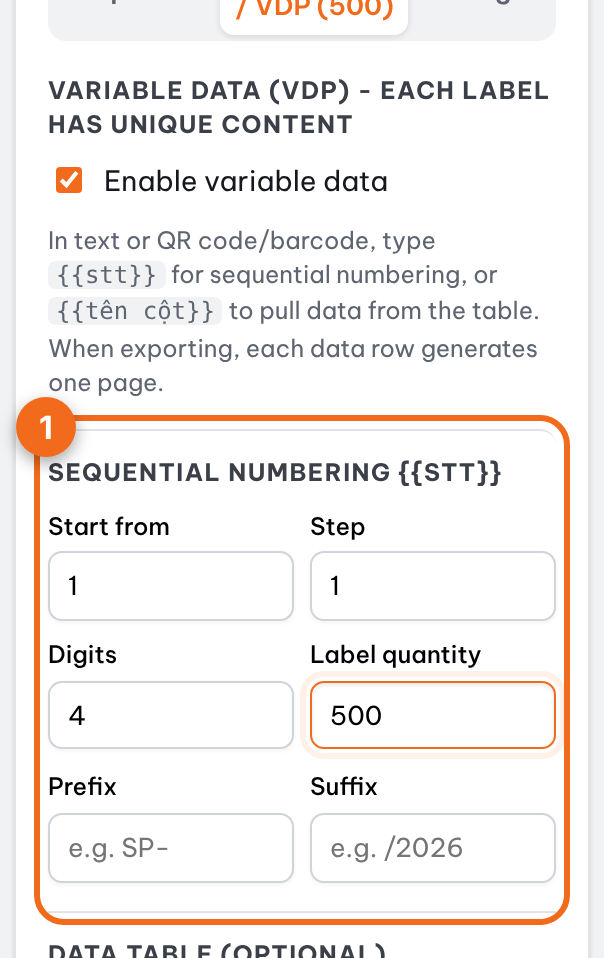
- Sequential numbers with the {{stt}} placeholder (replaced by 0001, 0002… on each ticket): start from, step, digit count (0001, 0002…)
- Prefix and suffix: TKT-0001/2026
- Cut and stack order: after trimming, each pile runs in sequence
- A separate number series for each design when the file has several pages
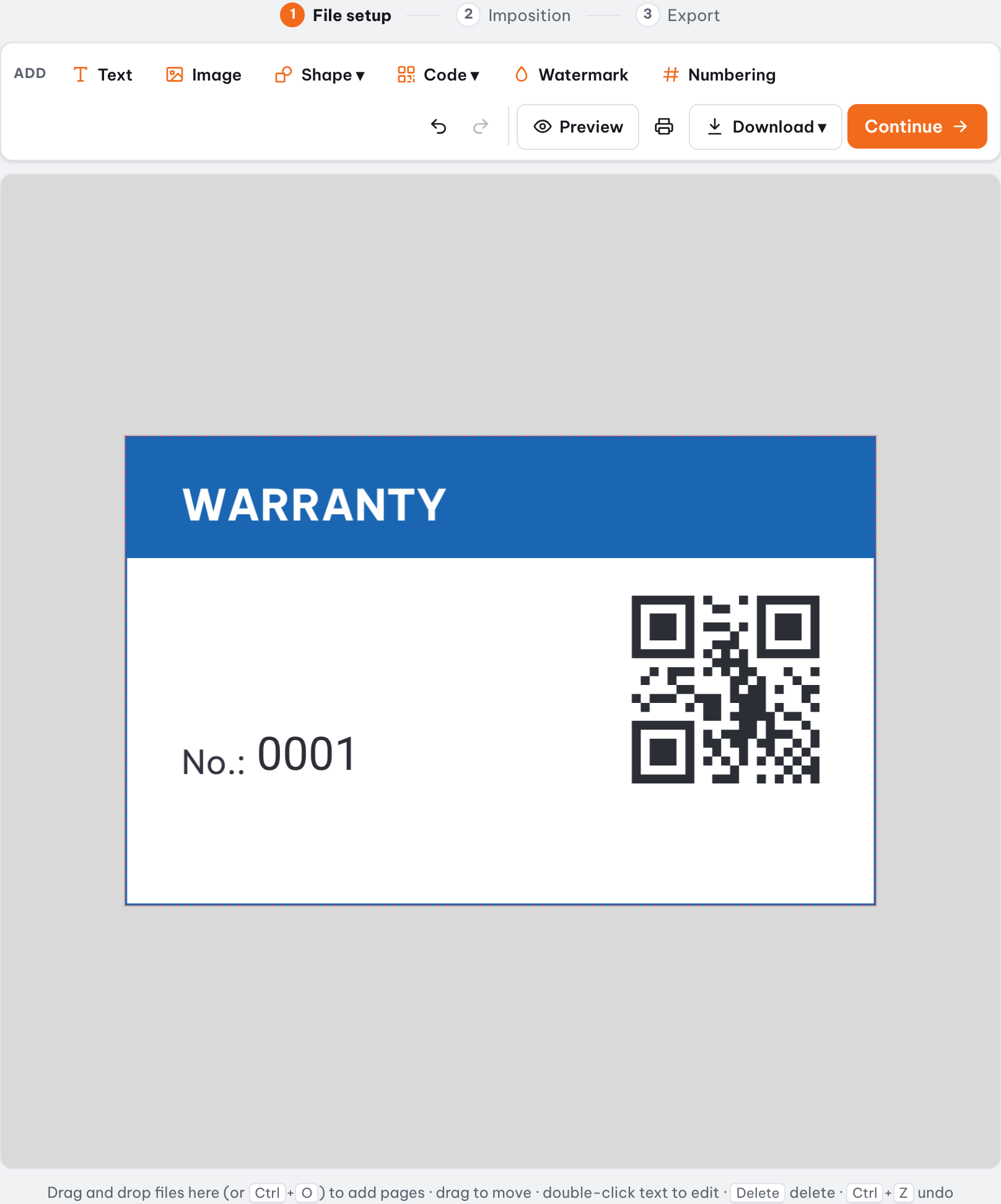
- Add a QR code or barcode from the number for ticket checking
- Nest the run on a print sheet, straight cut and export PDF
How it works
- Open your ticket or slip design and click "Numbering" on the toolbar.
- Drag the {{stt}} frame where the number goes, set font, size and color; set start, step, digits and count.
- Click Continue, choose straight cutting and cut-and-stack order if you trim whole stacks.
- Export the print PDF, then trim and arrange the piles in order.
Why do tickets need numbers that run in order after trimming?
Tickets and raffle slips are usually printed as many identical sheets stacked and trimmed together. If every sheet is numbered in sheet order (1 to 8 on the first sheet, 9 to 16 on the second…), after trimming you have to pick pieces by hand to put them back in order. Cut-and-stack numbering solves this: each position on the sheet carries a continuous run of numbers.
Example: 500 tickets, 8 per sheet. Trimto lays out 63 sheets; the pile from position 1 holds tickets 1 to 63, position 2 holds 64 to 126, and so on up to position 8 with 442 to 500 (its last four sheets are left blank because the run ends at 500). Trim the whole stack once, put the eight piles on top of each other in position order and the set runs from 1 to 500.
Sheet order vs cut and stack order
For large quantities, cut-and-stack numbering saves a lot of sorting time and reduces mix-ups.
| Numbering | How it works | Use it when |
|---|---|---|
| Sheet order | Numbers increase one after another across each printed sheet | Small runs you can sort by hand, or when each sheet is used on its own |
| Cut and stack | Each position on the sheet carries a continuous run; after trimming, stacking the piles by position gives consecutive numbers | Large runs trimmed as a whole stack, when you want the set in order without re-sorting |
Start from, step, prefix and suffix
| Field | Meaning | Example |
|---|---|---|
| Start from | Number of the first ticket | 1 |
| Step | How much each ticket increases by | 1 |
| Digits | Pads with leading zeros to this width | 4 → 0001 |
| Count | How many tickets | 500 |
| Prefix / Suffix | Text before or after the number | TKT-0001/2026 |
Several ticket types, each with its own series
When the file has several pages, each page is a design with its own number series: open a page and set the numbering of that page, while the others stay as they are. This suits ticket classes (VIP, standard) that need separate runs.
Add a QR code to check tickets
QR or barcode content can contain {{stt}}, so every ticket carries a code that matches the number printed on it. Check tickets by scanning the code and comparing the number.
Nest on the sheet and trim
Click Continue and the whole run moves to the layout step with "Print by quantity", which works out the fewest sheets, always enough or more, never short. Rectangular tickets suit straight cutting; choose cut-and-stack order if you trim whole stacks.
Step-by-step guides
Further reading
FAQ
- Is numbering tickets and raffle slips free on Trimto?
- Yes. Sequential numbering, cut-and-stack order, QR codes and PDF export are free with no watermark. Files are processed in the browser and never uploaded to a server.
- What is cut-and-stack numbering?
- A way of numbering so every position on the sheet carries a continuous run. After printing, trimming the stack and arranging the piles by position gives consecutive numbers without re-sorting each sheet.
- Can numbers have leading zeros and a prefix?
- Yes. Set the digit count (for example 4 prints 0001) and add a prefix and suffix such as TKT-0001/2026.
- Can different ticket classes have their own numbering?
- Yes. Each page in the file is a design with its own start, step and count; the numbering you edit is always that of the page you have open.
- Can I add a QR code that matches the ticket number?
- Yes. QR or barcode content can contain {{stt}}, so every ticket gets its own code matching the printed number.