
Booklet page order calculator
A saddle-stitched booklet is made of sheets folded in half and nested, so pages are not in reading order on the printed sheet: the outermost sheet carries the last and the first page. Enter your page count below to see which pages sit on each side of each sheet, or let Trimto impose your PDF automatically.
Open the booklet tool →Free · runs in browser · files never leave your device
3 sheets, 12 pages. 12 pages is already a multiple of 4, no blank pages needed.
| Sheet (outermost is 1) | Front (left | right) | Back (left | right) |
|---|---|---|
| 1 | 12 | 1 | 2 | 11 |
| 2 | 10 | 3 | 4 | 9 |
| 3 | 8 | 5 | 6 | 7 |
Features
- Enter a page count and get the page order on every side of every sheet
- Adds blank pages to reach a multiple of 4
- Left | right of each side is shown as the reader sees it
- Matches the way Trimto imposes saddle-stitched booklets
- To impose a real PDF, open the tool: it adds trim marks, fold marks and creep compensation
How it works
- Enter the total number of pages above.
- Read the table: each row is one printed sheet, with a front and a back, each carrying two pages (left | right).
- If the page count is not a multiple of 4, add the blank pages at the end as the note says.
- Want the print file right away? Open the booklet tool and drop in your PDF.
Why are pages not in reading order?
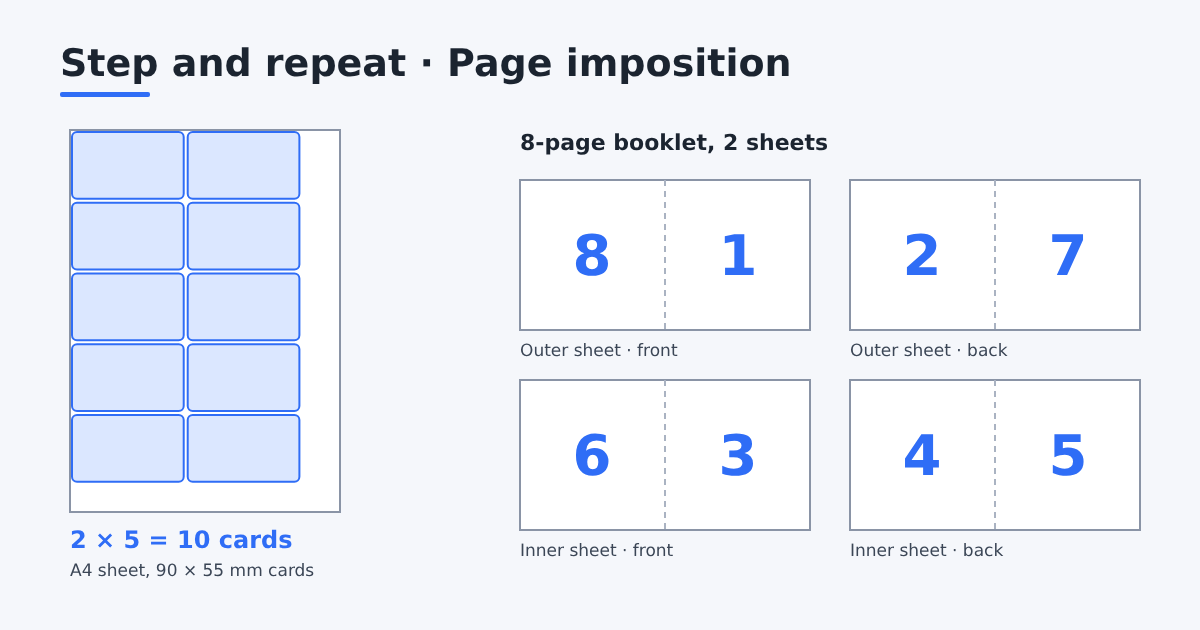
Each sheet of paper is printed on both sides and folded in half to make 4 pages. Sheets are nested inside each other and stapled along the fold, so the outermost sheet holds the first and last pages and the innermost holds the two middle pages. That is why page 8 sits next to page 1 on the printed sheet, not page 2.
Example: an 8-page booklet
General rule: for sheet k the front is (total − 2k + 2) | (2k − 1) and the back is 2k | (total − 2k + 1), counting k from 1 with a total that is a multiple of 4. The calculator above does this for any page count.
| Sheet | Front (left | right) | Back (left | right) |
|---|---|---|
| Sheet 1 (outermost) | 8 | 1 | 2 | 7 |
| Sheet 2 (inside) | 6 | 3 | 4 | 5 |
Page count must be a multiple of 4
Each folded sheet has 4 pages, so a saddle-stitched booklet always has a page count divisible by 4: 8, 12, 16, 20 and so on. If your content is 10 pages you need 2 blank pages. It is better to use them on purpose at the end (notes, back cover) than to leave them empty, and the calculator tells you how many you need.
Creep compensation for thick booklets
The thicker the booklet, the further the inner sheets stick out after folding, so when the edge is trimmed the inner pages lose more margin than the outer ones. In the Trimto booklet tool, enter the inner paper thickness to shift each sheet content toward the spine evenly (see the binding guide).
Step-by-step guides
Further reading
FAQ
- Why must a saddle-stitched booklet have a multiple of 4 pages?
- Because each sheet folded in half gives 4 pages. A page count that is not divisible by 4 needs blank pages, usually added at the end.
- Which sheet is sheet 1?
- The outermost sheet of the booklet. Its front carries the last page and page 1, so the back cover and the front cover.
- Does this calculator replace the imposition tool?
- No. The calculator only shows page order. For a print PDF with trim marks, fold marks and creep compensation, open the Trimto booklet tool.
- Is the calculator free?
- Yes. It is free and runs in your browser; nothing is sent to a server.
- I have 10 pages. What should I do?
- Add 2 blank pages to reach 12. The calculator shows where those two pages fall on the printed sheets.