
What is creep in booklet printing and how to fix it
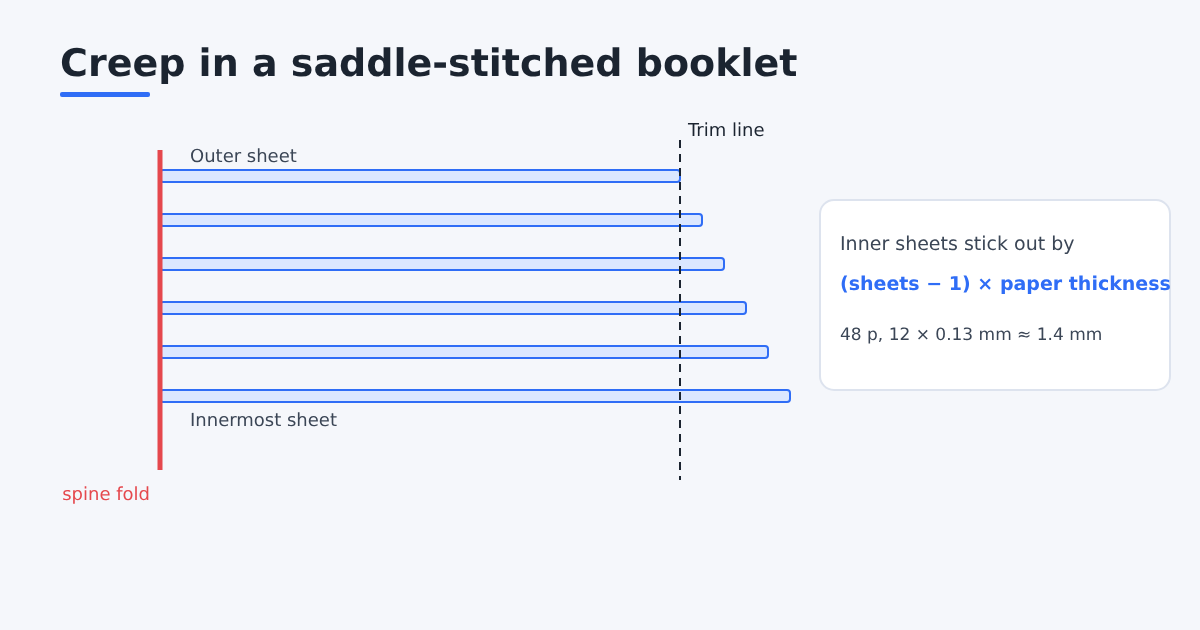
Creep (also called push-out or shingling) is what happens when you fold several sheets inside each other: the inner sheets stick out a little further than the outer ones. After the booklet is trimmed flat at the front edge, the inner pages lose a sliver of their outer margin, and their content ends up closer to the trimmed edge than on the outer pages. Creep only affects saddle-stitched booklets, where all sheets are nested around one fold.
Why it happens
Every sheet has thickness. When it wraps around the sheets inside it, the fold needs a little more room, so each sheet sits slightly further from the spine than the one inside it. The more sheets, the bigger the difference between the outermost and innermost sheet.
How big is it?
The total shift is roughly (number of sheets − 1) × paper thickness.
Worked example. A 48-page booklet is 12 nested sheets (4 pages each). On 150 gsm coated paper, about 0.13 mm thick:
- innermost sheet shift: (12 − 1) × 0.13 = about 1.4 mm
That is enough to make the outside margins of the centre pages visibly narrower after trimming, and to risk cutting into page numbers or text near the fore-edge. A 16-page booklet (4 sheets) shifts only 3 × 0.13 ≈ 0.4 mm, which most people ignore.
How to compensate
You shift the content of each inner page toward the spine by the accumulated amount. The outermost sheet stays where it is, the next one shifts by one paper thickness, the next by two, and so on. After trimming, margins look the same on every page.
In Trimto's booklet imposition, enter the paper thickness in Creep compensation (mm per sheet); the tool applies the progressive shift for every nested sheet and warns you if the innermost shift is large enough to push text into the fold. Leave it at 0 for thin booklets.
Creep at a glance
Shift of the innermost sheet, using the rule above. Paper thickness (caliper) values are typical and differ between mills.
| Pages | Nested sheets | 0.10 mm paper (80 gsm uncoated) | 0.13 mm paper (150 gsm coated) | 0.20 mm paper (heavy silk) |
|---|---|---|---|---|
| 16 | 4 | 0.3 mm | 0.4 mm | 0.6 mm |
| 32 | 8 | 0.7 mm | 0.9 mm | 1.4 mm |
| 48 | 12 | 1.1 mm | 1.4 mm | 2.2 mm |
| 64 | 16 | 1.5 mm | 2.0 mm | 3.0 mm |
A useful rule of thumb: below about 0.5 mm nobody notices, between 0.5 and 1.5 mm you see uneven margins on the centre spread, and above that page numbers near the outer edge are at risk.
Which pages move, and by how much
Take a 32-page booklet on 0.13 mm paper. It has 8 sheets:
| Sheet | Pages on it | Shift toward the spine |
|---|---|---|
| 1 (outer) | 1, 2, 31, 32 | 0 mm |
| 2 | 3, 4, 29, 30 | 0.13 mm |
| 4 | 7, 8, 25, 26 | 0.39 mm |
| 6 | 11, 12, 21, 22 | 0.65 mm |
| 8 (centre) | 15, 16, 17, 18 | 0.91 mm |
Both pages on the same sheet sit at the same depth in the booklet, so they creep by the same amount (each toward its own fore-edge). That is why the pages of the centre spread look like they have the widest inner margin before trimming and the narrowest outer margin after trimming, if nothing is done.
Check it with a paper dummy
Before a long run, ask the printer for a blank dummy in the real paper, or fold one yourself: take the right number of sheets, nest them, fold them firmly and staple them. Measure how far the centre sheet sticks out at the front edge. That number is your real total creep, and dividing it by (sheets − 1) gives the value per sheet to enter in the software.
Design choices that hide creep
- Wider outer margins. A 12 mm outer margin hides a 1 mm shift much better than a 5 mm one.
- No frames close to the trim. A thin border 4 mm from the edge makes the shift obvious on every inner page.
- Page numbers away from the outer corner. Put them at the bottom centre, or at least 8 mm in from the edge.
- Lighter paper for the inside. A heavier cover with thinner inner pages gives a solid feel with less creep.
Tips
- Use the real paper thickness from your printer's spec sheet. 0.13 mm is just a reference for 150 gsm coated paper.
- Keep important content at least 5 mm inside the trim, so a small error never cuts it (safe area).
- Above roughly 60 to 80 pages, perfect binding avoids creep altogether, because its pages are glued at the spine instead of nested.
Planning page counts first? The booklet page order calculator shows how many sheets you need.
Sources
- Adobe, Print booklets in InDesign: the Print Booklet dialog and its creep setting.
- Wikipedia, Saddle stitch: how nested, folded sheets are stapled through the fold.