
Free imposition software: 6 options compared
Imposition software arranges pages or copies on a press sheet so that after printing, cutting and folding they come out right. Professional tools cost hundreds of dollars or need Adobe Acrobat Pro, but several free options cover everyday jobs: business cards, labels, stickers, booklets and zines. This page compares six of them. We make Trimto, so we kept every statement about the other tools to what their makers publish, read in November 2026, with links at the end. Prices and limits change, so check the vendor pages before you decide.
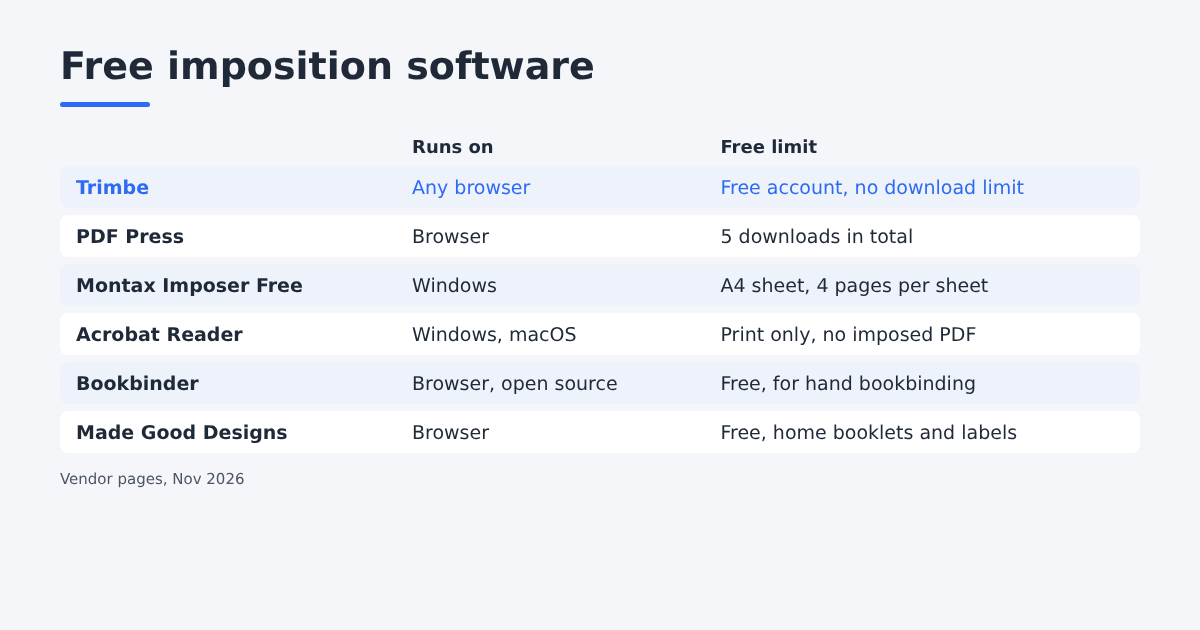
At a glance
| Tool | Runs on | Free limit | Best for |
|---|---|---|---|
| Trimto | Any browser; installable as an app | Free account needed to download; no download limit | Labels, stickers with cut lines, cards, tickets, booklets |
| PDF Press | Browser | Sign-in; 5 downloads in total, 8 hours apart | Trying a full browser tool before paying |
| Montax Imposer Free | Windows (plug-in for full Acrobat, or standalone) | Output sheet up to A4, up to 4 pages per sheet | Learning a desktop imposer on small sheets |
| Acrobat Reader | Windows, macOS | Free; print-time only | Printing a booklet or 2-up at home |
| Bookbinder | Browser, open source | Free (MPL-2.0) | Hand bookbinding with signatures |
| Made Good Designs | Browser | Free, no sign-up | One-off saddle-stitch booklet, label sheets |
1. Trimto
Trimto runs in the browser and processes files on your computer. It has two workspaces:
- Quick imposition: step and repeat with single or double cut, bleed handled automatically, crop marks, registration marks and a color bar; die-cut sticker nesting that traces each shape, nests them tightly and exports a CutContour cut line; numbering, Excel data and 11 barcode types for variable data printing.
- Book imposition: booklets (saddle stitch, perfect binding, spiral) with cover and creep, folded brochures and mini zines.
Limits: downloading needs a free account. There is no PDF/X output label, no hot folder or server mode, and no work-and-turn layout.
2. PDF Press
A browser imposition tool that also processes files on your device. Its job types include booklet, n-up, cut and stack, gang sheet, step and repeat and poster.
Free limit: you sign in to download and get 5 free downloads in total, at least 8 hours apart. Pro is USD 12 per month or USD 120 per year.
Good for: testing a full set of browser imposition jobs. For regular work you will need Pro.
3. Montax Imposer Free
A Windows imposition program, available as a plug-in for full Adobe Acrobat (Reader does not work) or as a standalone app. The free edition has the same features as the paid one, but the output sheet is limited to A4 and 4 pages per sheet. The cheapest paid edition, Basic, is a one-time licence of USD 75 (plug-in) or USD 95 (standalone), limited to A3 and 10 pages per sheet.
Good for: home and office printers, and trying the desktop workflow before buying. A4 is too small for most press sheets.
4. Adobe Acrobat Reader (print dialog)
The free Reader can impose at print time. In Print > Page Sizing & Handling, Booklet reorders pages for a folded, stapled booklet, and Multiple prints several pages per sheet.
Limits: it prints, it does not save an imposed PDF, unless you print to a PDF printer. Multiple scales pages to fit, so a card loses its exact size, and there is no bleed, gap or crop mark per item. See how to impose in InDesign, Illustrator and Acrobat for the steps.
5. Bookbinder (bookbinder-js)
An open-source web app (MPL-2.0) that reformats a PDF for bookbinding. It lays out signatures in folio, quarto, octavo and sextodecimo, plus perfect-bound and sewing marks, and can be saved to run offline.
Good for: hand bookbinders who fold and sew signatures. It is not built for labels, cards or commercial cutting.
6. Made Good Designs tools
A collection of free browser tools with no sign-up and no watermark. Its PDF booklet maker reorders pages for saddle stitch, two per side on A4 or Letter, adds blanks and a fold mark. Its label maker fills sheets compatible with common Avery codes (such as 5160 and L7160), with CSV mail merge.
Good for: a quick home booklet or an Avery-style label sheet. There is no choice of press sheet, cut type or nesting.
What about PDFsam?
PDFsam Basic is free and open source, but its free tools are merge, split, mix, rotate, extract and insert pages. N-up is a feature of the paid PDFsam Visual, so it is not on this list.
How to choose
| Your job | Pick |
|---|---|
| Business cards, labels or tickets on SRA3, A3, 12 × 18 or 13 × 19 in | Trimto step and repeat |
| Shaped stickers for a cutting plotter | Trimto die-cut nesting |
| Numbered tickets or Excel data, cut and stack | Trimto variable data |
| A booklet on a home printer | Acrobat Reader or Made Good Designs |
| A booklet for a print shop, with cover and creep | Trimto booklet imposition |
| Hand-sewn book signatures | Bookbinder |
| Avery label sheets at home | Made Good Designs label maker |
| An Acrobat-based workflow with PDF/X | A paid plug-in such as Quite Imposing Plus or Montax |
If you are new to the topic, read what is imposition and print layout first.
Sources
- PDF Press, pricing and home page: free downloads, Pro price, job types.
- Montax, products and editions: Free and Basic limits and prices.
- Adobe Acrobat Help, Print booklets and Print multiple pages per sheet.
- Bookbinder, project page on GitHub: layouts and licence.
- Made Good Designs, free PDF booklet maker and label maker.
- PDFsam, PDFsam Basic and PDF n-up.