
Trimto vs Quite Imposing Plus: an honest comparison
Both tools arrange pages and copies on a press sheet, but they work in very different ways. Quite Imposing Plus is an imposition plug-in for Adobe Acrobat from Quite Software. Trimto is a free tool that runs in your browser. This page compares them as fairly as we can. Every statement about Quite Imposing Plus comes from the vendor's own pages (product page, features and download page), read in November 2026. Check those pages for anything that has changed since, and note that product names belong to their owners.
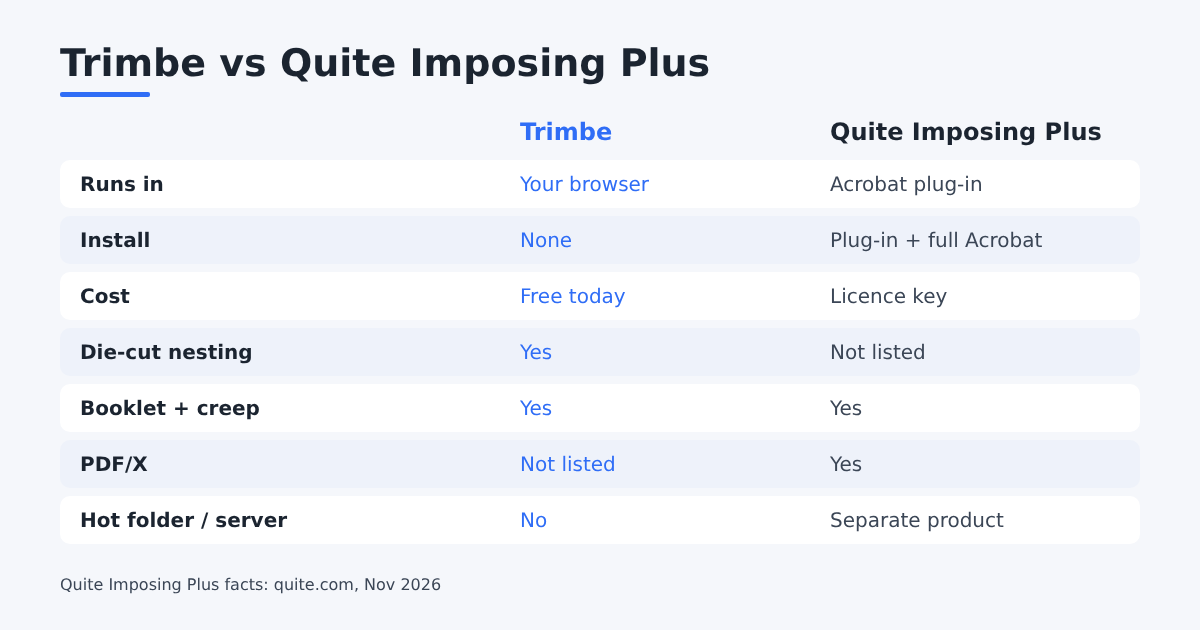
At a glance
| Trimto | Quite Imposing Plus | |
|---|---|---|
| Where it runs | In your browser, nothing to install; files are processed on your computer | A plug-in inside Adobe Acrobat; needs a full copy of Acrobat Standard or Professional, the free Reader does not work |
| Cost | Free to use today | A purchased licence key; see the vendor's price list for current prices |
| Step and repeat | Yes, with single and double cut and bleed settings | Yes; version 6 can rotate pages when more will fit |
| Die-cut nesting and cut lines | Yes: traces outlines, nests shapes tightly, exports a CutContour cut line | Not listed on the features page |
| Booklets and creep | Booklet imposition with a creep setting (mm per sheet) | Booklet maker, and Trim and Shift for creep |
| Variable data and numbering | Numbering and Excel/CSV data, with cut-and-stack order | Variable data merge from a data source such as CSV; shuffle for cut stacks |
| Bleed for files without it | Colour or mirror underlay | Generate bleed by mirroring or scaling (version 6) |
| Automation | Saved settings templates | Automation sequences; a separate hot-folder product, Quite Hot Imposing, for server use |
| PDF/X | Not a listed feature | Supports PDF/X-1a, X-3, X-4 and X-5 |
| Platforms | Any modern browser | Windows 10 or 11 and recent macOS, with a supported Acrobat version |
Where Quite Imposing Plus is stronger
- Inside Acrobat. If your whole prepress already happens in Acrobat, an imposition plug-in fits that workflow, and the combined pages become a new PDF you can check.
- Depth. Its features page lists many more commands: stick-on text, numbers and masking tape, page tools, conditional page insertion, manual placement and saved automation sequences.
- PDF/X handling and a server product for hot-folder use.
- Translated versions in several languages, through the vendor's resellers.
Where Trimto fits better
- No install and no licence. Open a page and start. It also works on a machine without Acrobat, and on Linux or a Chromebook.
- Labels, stickers and cutting. Die-cut nesting, cut-line generation and CutContour export are built in, for print-and-cut work.
- Quick jobs. Small print shops can drop a file, set sheet size and spacing, and export without building a control file.
The same jobs in each tool
The vendor's feature list names the commands, so here is how three everyday jobs map to each tool.
| Job | Trimto | Quite Imposing Plus |
|---|---|---|
| 500 business cards on SRA3 | Drop the PDF in step and repeat, pick SRA3, choose single or double cut, export | Open the PDF in Acrobat, run Step & Repeat, add printer's marks from a background template |
| Numbered raffle tickets, cut and stack | Add a number series or an Excel list, choose "By stack" | Stick on Numbers (leading zeros are supported), then Shuffle Pages with a "signature" rule for cut stacks |
| 30-page booklet | Booklet imposition pads to a multiple of 4 and sets creep per sheet | Insert conditionally ("multiple of 4 pages"), Shuffle Pages for the booklet order, Trim & Shift for creep |
| Sticker sheet with shaped stickers | Die-cut nesting traces the outlines and exports a CutContour line | No nesting or cut-line command on the features page |
| Poster split across smaller sheets | Not available | Tile Pages, with overlap or bleed |
Both tools can lay out cards, tickets and booklets. The difference is where you work (a browser page or Acrobat) and how much you can script.
Questions to ask before you choose
- Do you already own Acrobat Standard or Pro? Quite Imposing Plus needs it. Without it, add Acrobat's subscription to the cost.
- Do you need a hot folder or a workflow server? Quite's separate product, Quite Hot Imposing, runs from a watched folder or command line and plugs into Enfocus Switch. Trimto has no server mode.
- Is most of your work labels and stickers? Shaped stickers need nesting and a cut line, which Trimto has built in.
- Do your printers require PDF/X? Quite checks and keeps PDF/X data. Trimto keeps vectors, CMYK and spot colors, but does not label its exported PDF as PDF/X (it writes no PDF/X output intent). If your printer requires PDF/X, convert or verify the exported file with a preflight tool such as Acrobat Pro's Preflight.
- Who runs the job? A browser page with a few settings is easier to hand to a new staff member; a large command set rewards someone who uses it every day.
Which one should you choose?
- Choose Quite Imposing Plus if you live in Acrobat, need PDF/X conformance, or want automated and server-based imposition.
- Choose Trimto if you do labels, stickers, cards or booklets and want a free tool that runs anywhere.
- Many shops use both: a plug-in for complex book work and a browser tool for quick sticker sheets.
To try the browser tool, start with step and repeat imposition, die-cut sticker nesting or booklet imposition.