
Cut and stack numbering explained
Sequential numbering prints a different, increasing number on every ticket, form or label. Cut and stack is the numbering order that gives each position on the sheet its own continuous run, so after the whole pile is cut, each stack is already in sequence and the stacks simply go on top of each other.
When you print numbered items such as raffle tickets, receipts or labels several to a sheet, there are two ways to number them. The choice decides whether your finished stacks come out in order or need re-sorting by hand.
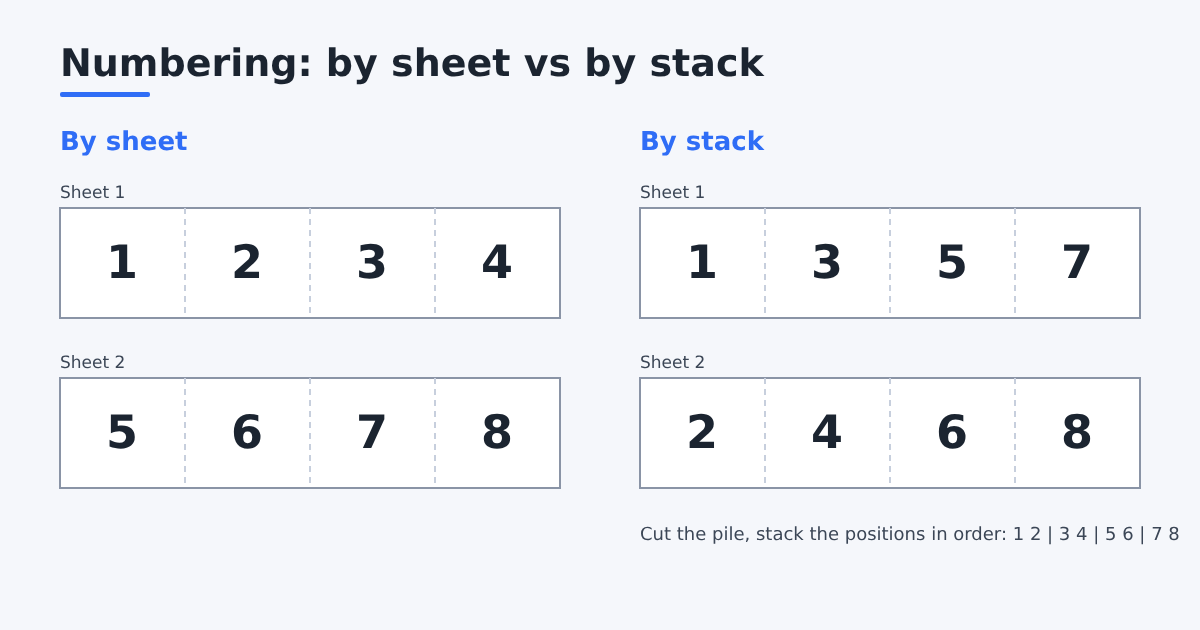
Numbering by sheet
The default. Sheet 1 carries numbers 1 to 4, sheet 2 carries 5 to 8, and so on. It is simple, and ideal when each sheet is a unit you keep together, such as a pad you glue as sheets.
The catch: after you cut a pile of sheets into single tickets, the tickets in each position have jumping numbers (1, 5, 9…), so you must sort them.
Numbering by stack (cut and stack)
Each position on the sheet gets one continuous run of numbers. After printing, you cut the whole pile of sheets, then stack the position piles one after another: the numbers run in unbroken order.
Worked example. 8 tickets, 4 per sheet, so 2 sheets. By stack, counting positions and sheets from 1 as in the table, the number printed in position p on sheet s is (p − 1) × (number of sheets) + s. For position 2 on sheet 1: (2 − 1) × 2 + 1 = 3.
| Position 1 | Position 2 | Position 3 | Position 4 | |
|---|---|---|---|---|
| Sheet 1 | 1 | 3 | 5 | 7 |
| Sheet 2 | 2 | 4 | 6 | 8 |
Cut the pile once: position 1 gives the stack 1, 2; position 2 gives 3, 4; and so on. Place the stacks in order and the whole run is 1 to 8.
On a real job of 1000 tickets, 4 per sheet, that is 250 sheets: sheet 1 carries 1, 251, 501, 751, and sheet 250 carries 250, 500, 750, 1000.
By sheet or by stack, compared
| By sheet | By stack | |
|---|---|---|
| Numbers on sheet 1 (1000 tickets, 4 up) | 1, 2, 3, 4 | 1, 251, 501, 751 |
| Order after cutting | Each position pile jumps by 4 | Each position pile is continuous |
| Sorting by hand | Needed for loose tickets | None, just stack the piles |
| Reprinting a damaged sheet | Easy, one sheet holds 4 neighbours | Easy, one sheet holds one number from each pile |
| Best for | Pads glued by sheet, proofs | Ticket books, invoices, coupons, labels |
When the count does not divide evenly
Real jobs rarely fit exactly. Take 1000 tickets, 6 per sheet. The stack length is 1000 ÷ 6 rounded up = 167 sheets. Positions 1 to 5 each carry 167 numbers (1 to 167, 168 to 334, and so on up to 835). Position 6 carries the rest, 836 to 1000, which is 165 numbers. On the last two sheets position 6 is left blank.
That is the important rule: the run is never shortened and numbers never repeat. You get every ticket you ordered, plus a couple of empty spots you can discard. Do not "fix" the gap by moving numbers around, or the piles stop being continuous.
Cutting in lifts
A guillotine can only cut a pile of limited height in one go, often around 8 to 10 cm of paper. 250 sheets of 80 gsm paper is about 2.5 cm and fits in one lift, but 1000 sheets of card do not. Split the pile into lifts (sheets 1 to 300, 301 to 600…), cut each lift, and then for each position stack the pieces lift by lift in the same order. Mark the lifts with a pen on the side of the pile before cutting so they are never mixed.
Numbering on a ticket and its stub
Raffle tickets and receipts often show the same number twice: once on the part the customer keeps and once on the stub. Put the same number field in both places on the design. Because both copies come from the same record, they always match, in either numbering order.
Check before the full run
- Print only the first and the last sheet.
- Check that the first sheet starts at 1 (or your start number) in position 1.
- Check that the last sheet ends with your last number and that blanks, if any, sit only at the end.
- Make sure the number format is right: leading zeros (0001), prefixes (A-001) and font size on the smallest ticket.
When to use which
- By stack for ticket books, invoices, coupons and any run where you cut the whole pile and keep tickets in order.
- By sheet when each printed sheet stays whole, or when you hand-sort anyway.
If several series share one sheet and need different numbers of sheets, the shorter series leaves its positions blank on the extra sheets, so numbers never repeat.
In Trimto
Set a number series in the data panel (see variable data from Excel), then at imposition choose Numbering order: By sheet or By stack. Trimto works out each position's run for you, even with several different series on one sheet. For ticket jobs see raffle ticket numbering, and plan how many fit per sheet with the items per sheet calculator.
Sources
- Adobe, Data merge in InDesign: how a data source of records fills a layout, the same idea as Trimto's number series.
- Wikipedia, Paper cutter: the guillotine used to cut a pile of sheets in one stroke.